





Heaven says on Tumblr


コメント: 6
Forum posts: 4
レベル: 1,
次のレベルは 27 xp
レベルランク: ルーキー
経験値: 23
翻訳家の経験値: 33
 ポストール:
サイトの掲示板に投稿する
 コメンテイター:
サイトにコメントを投稿する
Heaven says on Tumblr
Heaven says on Tumblr
#1 : how i do a simple edit
First of all, I still want to say that you can find this kind of tutorial on the internet.
Here is my way to make a quick and easy edit.
→ Open photoshop [ i use CS5 ] and open your photo.
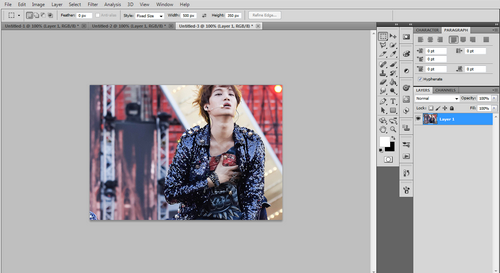
↳ The changes I made in this photo is the dimension. I croped the photo to the size i wanted. [ i.e. 500*350 ]
→ Drag a PSD on the photo.
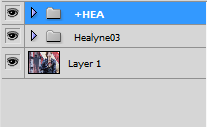
↳ So you have to see this. Don’t forget, after that : select the layer 1 [ sometimes, the name of this layer is : background.
I have two methods to make the image sharper :
METHOD 1:
→ Filter ➜ Sharpen ➜ Smart Sharpen
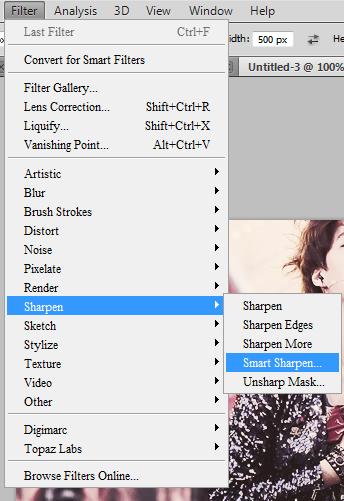
↳ and my settings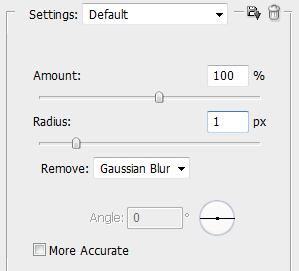
METHOD 2:
→ Filter ➜ Noise ➜ Reduce Noise
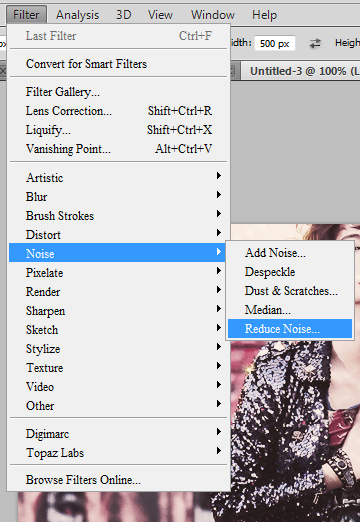
↳ and my settings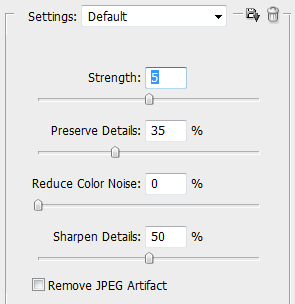
Sometimes I darkened the image a bit.
→ Layer ➜ New Ajustment Layer ➜ Curse
- Opacity 30% or 50%
Well, I think that’s all. It’s not very complicated. I think I made other adjustments, but after that, it depends. Do you have questions? Do you understand? I am listening.
Heaven says on Tumblr
Heaven says on Tumblr
Heaven says on Tumblr
Heaven says on Tumblr
Heaven says on Tumblr
Heaven says on Tumblr
Heaven says on Tumblr
Heaven says on Tumblr

English :
COMICS / MANGAS | AUTHORS | COMMENTS
 Español :
COMICS / MANGAS | AUTHORS | COMMENTS
Español :
COMICS / MANGAS | AUTHORS | COMMENTS
Français :
COMICS / MANGAS | AUTHORS | COMMENTS
 日本語 :
COMICS / MANGAS | AUTHORS | COMMENTS
日本語 :
COMICS / MANGAS | AUTHORS | COMMENTS
 Русский :
COMICS / MANGAS | AUTHORS | COMMENTS
Русский :
COMICS / MANGAS | AUTHORS | COMMENTS

















 CC BY-NC-ND 3.0